DSAR Document Redaction Inside Privacy360
Redact personal data and exempt information without leaving your DSAR workflow. Every request, document and decision stays in one record.
Suggestions a person approves. Originals stay private, in your own region.
What is Privacy360 Document Redaction?
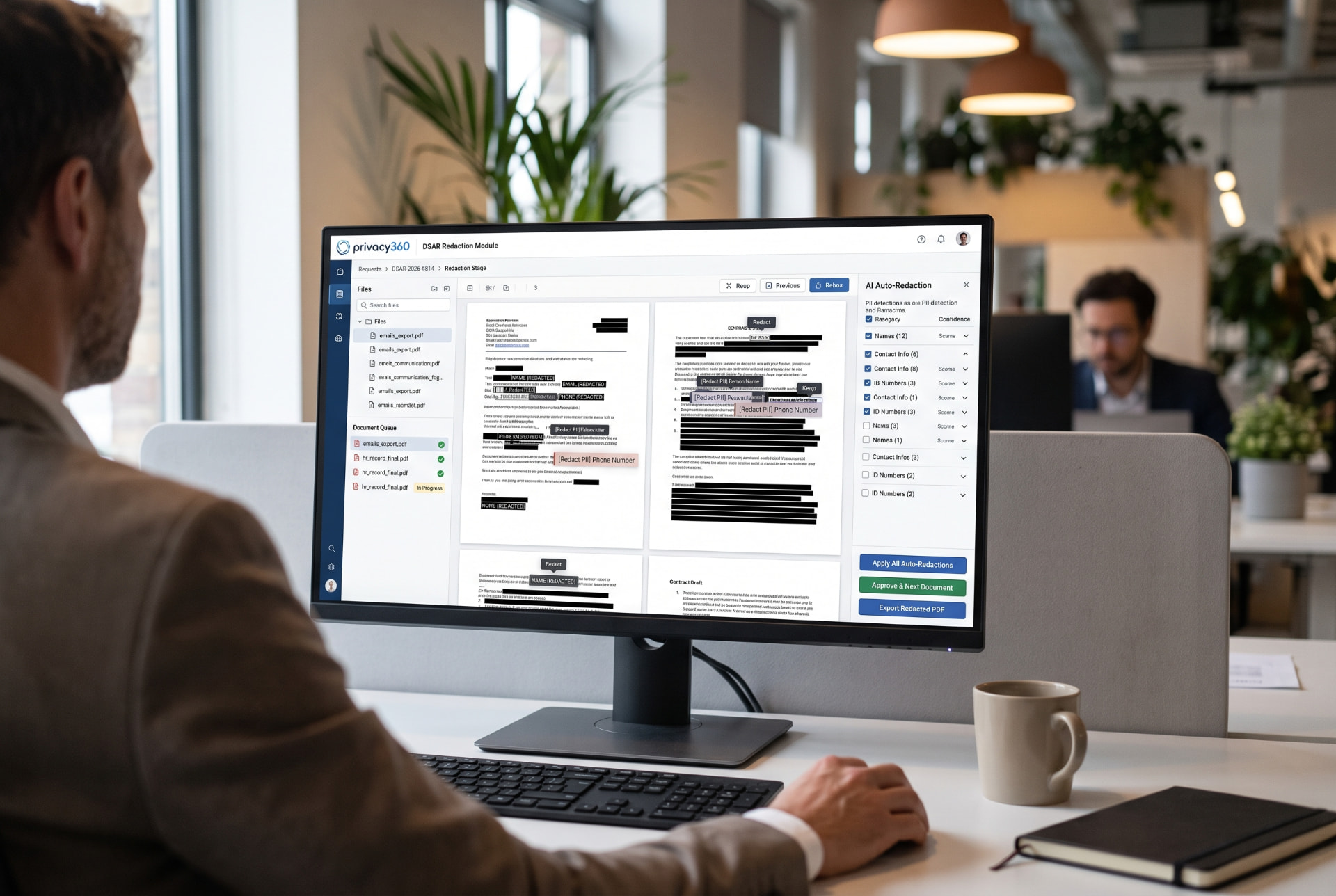
Privacy360 Document Redaction is a module for redacting PDF and Word documents inside the Privacy360 platform. It suggests personal data for removal, and a person approves every redaction. Each redaction carries a reason. The export is permanent and checked before release. Because redaction stays in the platform, documents are not exported to a bolt-on or cloud tool, and the audit trail stays complete.
DSAR document redaction: one platform, one record
Keep the request, documents and disclosure decisions together. Our guide follows a redaction job from upload through review to release.
Why do bolt-on redaction tools weaken DSAR control?
They split one request across several systems. As a result, control, evidence and accountability become harder to show.
Documents leave the platform
Bolt-on tools need files exported first. Consequently, sensitive records travel outside your controlled environment.
Extra processors and DPAs
A separate service is often another processor. Therefore, it may need its own contract and due diligence.
International transfer questions
Some services process files in other regions. As a result, a transfer assessment may be needed.
Version confusion
Copies multiply across systems. In contrast, reviewers need one clear version of each document.
Broken audit trail
Redaction history sits apart from the request. Therefore, the record no longer tells the whole story.
Manual re-uploading
Redacted files must be returned by hand. Because steps are manual, errors and delays increase.
Wrong version disclosed
With several copies in circulation, the unredacted file can be sent by mistake.
The solution: one platform, one record
Redaction happens inside the DSAR lifecycle, not after it. Therefore, every step from intake to closure shares one record.
- Step 1
Intake
- Step 2
Identity verification
- Step 3
Data collection
- Step 4
Review
- Step 5
Redaction
Inside Privacy360
- Step 6
Exemptions log
- Step 7
Disclosure
- Step 8
Closure
How does in-platform redaction compare?
In-platform redaction keeps the request, documents and evidence together. Other approaches vary by product, so check each one.
| Criterion | Privacy360 in-platform | Bolt-on tool | Standalone cloud service |
|---|---|---|---|
| Data leaves the platform | No. Redaction happens inside Privacy360. | Usually. Files are exported to the tool. | Yes. Files are uploaded to the service. |
| Additional processor | No new processor for redaction. | Depends on the tool and its hosting. | Typically yes, with its own terms. |
| Audit trail | Detection, approvals and export are logged. | Often held in the tool, apart from the request. | Held by the service, apart from the request. |
| Version control | Original kept privately; one released copy. | Copies can exist in several places. | Copies exist locally and in the service. |
| Link to DSAR record | Optional link to the DSAR request. | Manual cross-referencing. | Manual cross-referencing. |
| Deadline tracking | Deadlines stay on the linked DSAR request. | Tracked elsewhere. | Tracked elsewhere. |
| Exemption logging | Reason per redaction, compiled into a schedule. | Varies by tool. | Varies by service. |
| User access control | Approval and release limited to admins, enforced in the database. | Separate user management. | Separate user management. |
What can the module do?
It covers upload, review, approval and permanent release. Every capability below is available today.
PDF and Word upload
Upload PDF and Word (.docx) files. Add several files to one job, up to 50 MB each.
Suggestions a person approves
The system suggests names, contact details, addresses, ID and account numbers, bank details, dates of birth and health details. Nothing is redacted automatically.
Your data is processed for this request only and is not used to train AI models.
Keep-visible list
Named people and values are excluded from detection. Therefore, the data subject's own details stay readable.
Reviewer controls
Accept or reject each suggestion, or approve all at once. Draw your own boxes, or search a term and mark every instance.
Reasons and redaction schedule
Tag each redaction: third party, commercially sensitive, legal privilege, out of scope or other. Reasons are compiled into a redaction schedule.
Controlled approval and release
Only a client admin, partner admin or platform admin can approve redactions or release a file. This is enforced in the database.
Permanent export
The exported PDF is rebuilt with redacted areas flattened and metadata removed. If redacted content survives, the export is blocked.
Activity log
Every detection, approval, rejection and export is recorded. A fingerprint of the released file is kept.
How does it work?
- 1
Open a redaction job
Start a job on its own, or link it to a DSAR request. When linked, the requester joins the keep-visible list.
- 2
Upload the documents
Add the PDF and Word files collected for the request. Scanned pages without selectable text are redacted by hand.
- 3
Review the suggestions
Accept, reject or add redactions. For example, search a third party's name and mark every instance.
- 4
Tag reasons and approve
Record the reason for each redaction. An authorised admin then approves the redactions.
- 5
Release the redacted PDF
The export is checked before release. You receive the redacted file and its redaction schedule.
What does the law require?
Article 15 of the UK GDPR and EU GDPR gives individuals a right of access to their personal data. Organisations must normally respond within one month of receipt. That period can be extended by up to two further months for complex or numerous requests.
However, disclosure should not adversely affect the rights of others. Therefore, third-party data often needs redaction. In the UK, the Data Protection Act 2018 also sets out exemptions that may apply.
For authoritative detail, read the ICO guidance on subject access requests.
How are documents protected?
Access is restricted, originals are kept apart and every action is recorded.
- Approval and release are limited to authorised admins, enforced in the database, not only on screen.
- The unredacted original is kept separately in private storage, in the client's own region.
- Only people authorised for that client can see the original.
- Detection, approvals and exports are logged, with a fingerprint of each released file.
- Your data is processed for this request only and is not used to train AI models.
Read more about regional hosting on our data residency page.
Who is it for?
In-house DPO
Keep each request, its documents and its disclosure decisions in one record you can defend.
Legal and compliance teams
Apply consistent reasons for each redaction. As a result, privilege and third-party decisions stay traceable.
Outsourced DPO or consultancy
Work across clients with partner admin access. Each client's originals stay private and in their region.
Frequently asked questions
- What is DSAR document redaction?
- DSAR document redaction removes or obscures information before disclosure to a data subject. Typically, this covers personal data about other people and exempt information. The aim is to give the requester their own data without revealing what they are not entitled to see. Each decision should be recorded, so the organisation can explain it later if challenged.
- Why does it matter to redact inside the DSAR platform?
- Redacting in the same system as the request keeps one record and one audit trail. Sensitive documents are not exported to a third-party tool. Therefore, there are fewer copies, fewer hand-offs and less risk of sending the wrong version. In Privacy360, a redaction job can link directly to the DSAR request it supports.
- How is it different from a bolt-on or cloud redaction service?
- Bolt-on tools usually require exporting and re-importing files. Cloud services often add another processor and possible transfer questions. In both cases, the redaction history sits apart from the request record. In contrast, Privacy360 keeps the original, the redactions, the approvals and the released file together under the same access controls.
- Does redaction permanently remove the data?
- Yes. The exported copy is rebuilt with redacted areas flattened, so no text layer survives underneath. Document metadata is removed. The export is then checked before release, and it is blocked if any redacted value remains. The unredacted original is kept separately in private storage, visible only to authorised people, in the client's own region.
- Which file types are supported?
- You can upload PDF and Word (.docx) files, with several files in one job and up to 50 MB each. The released copy is a PDF. Scanned or image-only pages have no selectable text, so suggestions are not generated for them. However, a reviewer can still draw redaction boxes on those pages by hand.
- Can I record the exemption or reason for each redaction?
- Yes. Each redaction carries a reason: third party, commercially sensitive, legal privilege, out of scope or other. These reasons are compiled into a redaction schedule produced alongside the released file. The activity log also records who ran detection, who approved or rejected each item, and who exported the file and when.
- Does the module help meet the one-month DSAR deadline?
- It removes hand-offs between systems, which is a common source of delay. Because a redaction job can link to its DSAR request, the deadline stays visible on that request. Reviewers can approve suggestions in bulk or mark every instance of a term at once. Final approval still rests with an authorised person.
See DSAR redaction in one platform
Walk through a redaction job from upload to release with our team.