AI Contract Review for DPAs: Redline Privacy Agreements Without Depending on MS Word
By Robert Healey, CEO, Formiti Data International
Last updated:
AI contract review for DPAs that runs inside Privacy360, not a Word add-in. Clause-by-clause findings, playbook redlines and tracked-change exports.
Topics: Contract Review, Data Processing Agreements, AI Governance, Vendor Risk, UK GDPR
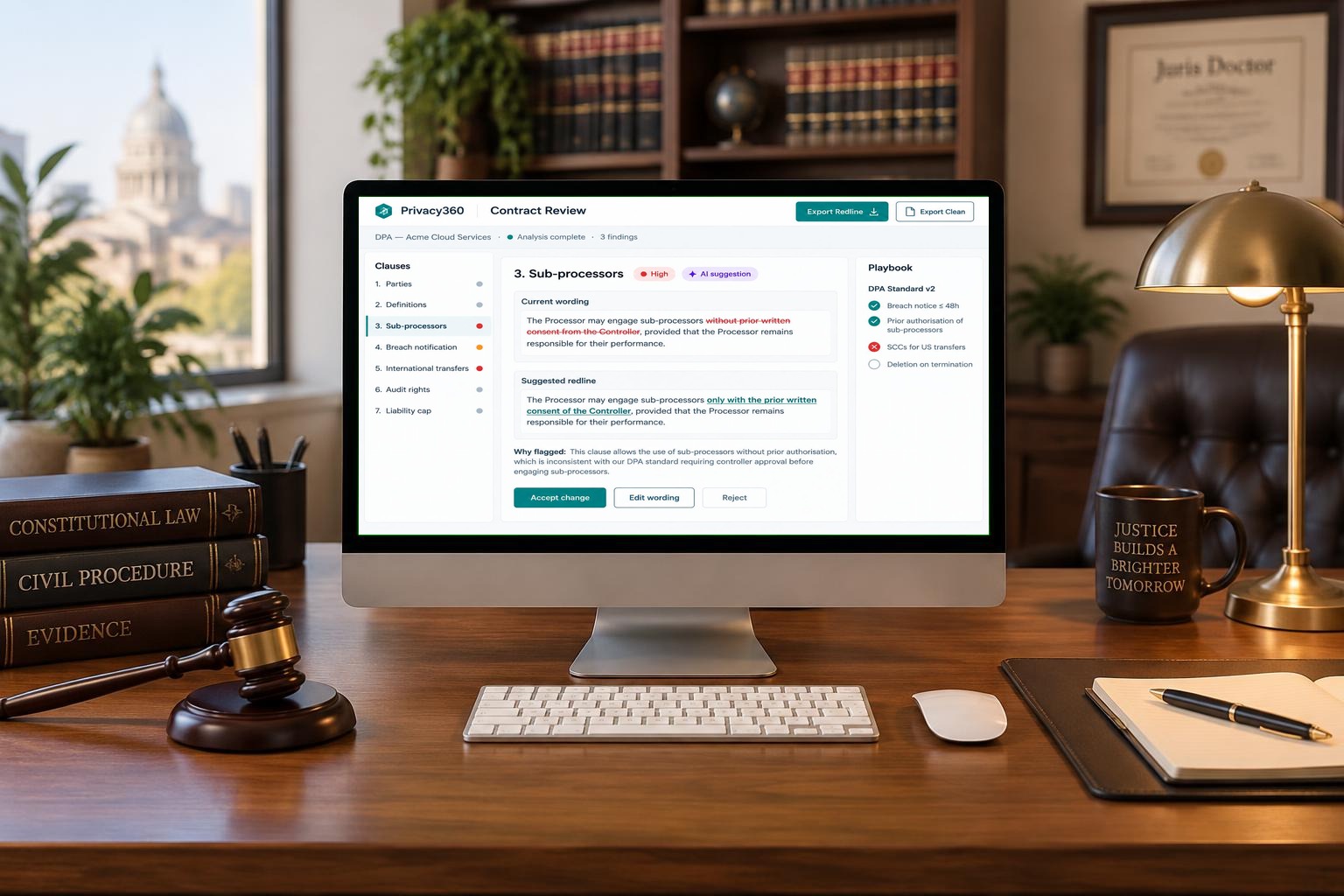
Putting this into practice? See how Privacy360's AI contract review for DPAs and SCCs handles it. Review DPAs, SCCs and AI vendor terms against your playbooks and export tracked changes.
The short answer
AI contract review for DPAs reads a privacy agreement clause by clause and checks each clause against your playbook. It then drafts redlines for a human reviewer to accept, edit or reject. Privacy360 Contract Review does this inside the Privacy360 platform. As a result, your review does not depend on Microsoft Word, Google Docs or an add-in running inside them.
This guide explains how AI-assisted DPA redlining works, what to look for, and why where the tool runs now matters.
Why DPA redlining is still a manual grind
Most privacy teams still redline data processing agreements by hand. First, someone reads every clause. Next, they compare it with the organisation's standard positions. Then they draft alternative wording and track every change in Word.
That process takes hours per agreement. Moreover, results vary by reviewer. One lawyer accepts a 72-hour breach notice period; another insists on 24 hours. Consequently, the same vendor can receive different positions from the same company.
The problem grows with volume. A mid-sized organisation may sign dozens of DPAs, SCCs and AI vendor terms each quarter. Without a consistent method, the backlog builds and risky clauses slip through.
What happened on 12–13 November 2026, and why it matters for legal tech
On the evening of 12 November 2026, a major Microsoft 365 outage began. Outlook, Teams, SharePoint and other services were disrupted worldwide. Reports described more than nine hours of downtime, with nearly 130,000 user reports on Down Detector. Microsoft pointed to server configuration problems, not a cyberattack.
For legal and privacy teams, the lesson goes beyond email. Many contract review tools are built as add-ins that live inside Word or Microsoft 365. When that platform stalls, so can the review workflow built on top of it. In particular, documents stored in SharePoint or OneDrive may be hard to reach.
In short, if your contract review tool depends on one productivity suite, that suite becomes a single point of failure.
How Privacy360 Contract Review works independently
Privacy360 Contract Review is built into the Privacy360 platform itself. It is not a Word add-in or a Google Docs extension. Therefore, the review runs in Privacy360's own environment, whatever is happening to your productivity suite.
Here is what that means in practice:
- Review in the browser. You upload the contract, run the analysis and review findings in Privacy360. You do not need Word open.
- Files stay with the record. The original, working drafts and finals are kept on file in Privacy360. So you are not hunting through SharePoint during an outage.
- Standard Word output. Exports are ordinary .docx files with tracked changes. Consequently, they open in Word, Google Docs, LibreOffice or any compatible editor.
- No lock-in to one suite. Microsoft 365 and Google Workspace users get the same workflow.
No cloud service can promise zero downtime. However, separating your contract review from your productivity suite removes one major dependency.
How AI-assisted DPA review works, step by step
- Upload the contract. Drop in a Word contract, such as a DPA or controller-to-processor terms.
- Complete a short intake. Confirm the parties, contract type and review focus.
- Choose a playbook. Select the positions your organisation requires, prefers or must escalate.
- Review clause-by-clause findings. Each finding links to the exact clause text, with a severity and a reason. A clean clause is reported as clean.
- Accept, edit or reject redlines. Suggested wording comes from your playbook. Nothing changes without your approval.
- Export. Produce a redline for the counterparty, a clean version and an internal review summary.
In most cases, the analysis runs in under a minute. As a result, first-pass reviews take minutes rather than hours.
Playbooks built from your records of processing
Generic checklists miss context. Instead, Privacy360 generates Contract Intelligence playbooks from your own records of processing.
Each playbook reflects your controller and processor roles. It also flags transfer mechanism gaps and includes a clause library with negotiation guidance. Open questions are tied to gaps in your register. Consequently, every contract is measured against how your organisation actually processes data.
What the playbook checks
| Clause area | Typical playbook position |
|---|---|
| Sub-processors | Prior notice and a right to object |
| Breach notification | A fixed notice period, such as 24 or 48 hours |
| Audit rights | Reasonable audit and inspection rights |
| International transfers | A valid mechanism, such as SCCs |
| Liability | Caps that do not undermine data protection duties |
| AI vendor terms | No training on your data without consent |
Keeping the lawyer in charge
AI should support legal judgement, not replace it. Therefore, Privacy360 Contract Review follows clear rules:
- The AI proposes; the reviewer decides.
- Short cross-reference clauses are left alone.
- Rules that do not apply do not fire.
- Nothing is rewritten silently.
In addition, your documents are processed for the request only. They are not used to train AI models.
Connecting contract decisions to governance
A signed DPA is not the end of the story. Contract positions should feed your wider privacy programme. For example, Privacy360 links review outcomes to vendor risk, your records of processing and AI governance.
As a result, a weak transfer clause becomes a tracked risk, not a forgotten note in a Word file.
Key takeaways
- AI contract review checks each DPA clause against your playbook and drafts redlines.
- A human reviewer accepts, edits or rejects every change.
- The November 2026 Microsoft 365 outage showed the risk of suite-dependent tools.
- Privacy360 Contract Review runs in its own platform, not inside Word or Google Docs.
- Exports are standard tracked-change Word files that open in any compatible editor.
Availability
Contract Review is in controlled release for selected Privacy360 tenants. To discuss access, book a demo or apply for an account.
Frequently asked questions
What is AI contract review for DPAs?
It is software that reads a data processing agreement clause by clause, checks it against your playbook and suggests redlines for a human to approve.
Does Privacy360 Contract Review need Microsoft Word?
No. The review runs inside Privacy360 in your browser. Exports are standard Word files, so you can open them in Word, Google Docs or other editors.
Would a Microsoft 365 outage stop Privacy360 Contract Review?
Privacy360 does not run on Microsoft 365, so an outage there does not stop the review itself. However, you may need email to send the redline to the other party.
Does the AI change contracts automatically?
No. Every suggested change needs reviewer approval. Nothing is rewritten silently.
Is my contract data used to train AI models?
No. Contract data is processed for your request only and is not used to train AI models.